

Printing costs add up quickly, and replacement cartridges often cost more than the printer itself. Finding the best printer for cheap cartridges can save hundreds of pounds over the device’s lifetime. The right printer balances upfront cost with long-term ink or toner expenses.
When choosing a printer with affordable cartridges, consider whether you need colour or just black and white, your monthly print volume, and whether standard or high-yield cartridges are available.
We tested multiple printers to identify the models that offer the lowest cartridge costs without sacrificing print quality or reliability.
1. HP DeskJet 2810e

This affordable all-in-one printer offers solid value with HP’s Instant Ink subscription that can cut cartridge costs by up to 70%.
Pros
- Instant Ink subscription dramatically reduces ongoing cartridge expenses
- Quick wireless setup through mobile app with QR code scanning
- Compact design fits easily in small home office spaces
Cons
- Print speeds are on the modest side at 7.5 pages per minute for black and 5.5 for colour, though this is perfectly adequate for typical home printing volumes.
We found the HP DeskJet 2810e incredibly straightforward to get running. Scanning the QR code with our phone and following the app prompts took just minutes. The whole process felt surprisingly painless compared to older printer setups we’ve wrestled with.
The real money-saving magic happens when you sign up for HP’s Instant Ink programme during setup. We get three months free to start, and the service automatically ships new cartridges before we run out. Since we only print occasionally, the cheapest plan covers our needs whilst keeping costs well below buying cartridges at retail prices.
Print quality meets expectations for everyday documents and casual photo printing. The colours come out reasonably vibrant for recipe printouts and school projects. We noticed the machine runs quieter than budget printers we’ve used previously.
Speed won’t impress anyone rushing to print a lengthy report. Watching it churn through multi-page documents requires patience. We also had to position it fairly close to our router because the WiFi connection dropped when we initially placed it in a back bedroom.
The 60-sheet paper tray handles weekly printing needs without constant refilling. Scanning and copying functions work reliably through the mobile app. We appreciate that HP included setup cartridges in the box so we could start printing immediately.
★ BEST BUY
2. Epson Expression Home XP-4200

The Epson XP-4200 offers reliable printing with affordable Pineapple 604 ink cartridges that won’t drain your wallet, making it an excellent choice for budget-conscious households.
Pros
- Individual ink cartridges mean you only replace the colour that runs out
- Compact design fits comfortably on small desks without taking over your workspace
- Wireless printing through the Epson Smart Panel app works smoothly from phones and tablets
Cons
- Colour printing at 15 ppm is noticeably slower than black and white, which is worth bearing in mind if you print a lot of colour documents regularly.
We’ve been using this all-in-one printer for everyday tasks, and the cost savings on ink really add up over time. The XP-4200 uses Epson’s four-colour Pineapple 604 cartridges, available in both standard and XL sizes. When one colour runs out, we simply swap that single cartridge instead of replacing an entire multi-colour unit.
Setting up wireless connectivity took just a few minutes through the Epson app. We appreciate the 6.1 cm LCD screen for quick copying jobs without turning on our computer. The automatic duplex printing feature helps reduce paper consumption, though it works more slowly than single-sided printing.
Print quality has consistently impressed us for both documents and photos. Black text appears crisp at 1440 dpi resolution, whilst colour prints maintain good clarity. The scanner handles photos well, and copying documents is straightforward using the touch screen.
Wi-Fi Direct proved particularly useful when we needed to print without accessing our main network. The Epson Creative Print app lets us print directly from Facebook and create greeting cards. At 4.3 kg, moving the printer between rooms is manageable when needed.
3. Canon PIXMA TR4755i

The Canon PIXMA TR4755i is a solid choice if you need an affordable all-in-one printer with reasonable running costs through its subscription ink service.
Pros
- The PIXMA Print Plan subscription means you’ll never pay inflated prices for emergency ink cartridges
- Wireless connectivity works reliably once set up, letting us print from phones and laptops without hassle
- Automatic duplex printing helps reduce paper costs over time
Cons
- Print speeds are on the modest side at 8.8 pages per minute for black and 4.4 for colour, so larger jobs require a bit of patience.
- The starter cartridges included in the box have a low page yield, meaning you will need replacement cartridges sooner than expected.
We found this printer handles everyday home office tasks without fuss. The wireless connection paired with our devices on the first attempt, and we appreciated not having to fiddle with cables. Printing quality impressed us for both text documents and colour photos.
The real value here comes from Canon’s ink subscription service. Instead of rushing to buy expensive cartridges when you run low, the printer automatically orders replacements that arrive before you run out. This takes away the usual anxiety about ink costs that plagues budget printer owners.
The 20-sheet automatic document feeder proved genuinely useful when we needed to scan multi-page documents. We simply loaded the pages and let it work through them rather than lifting the lid repeatedly. The compact design fits nicely on smaller desks without dominating the space.
However, the print speed won’t win any races. We noticed it takes a while to produce longer documents, though this seems typical for printers in this price range. The build feels a bit plasticky, but it hasn’t affected performance during our testing period.
4. HP Envy 6120e
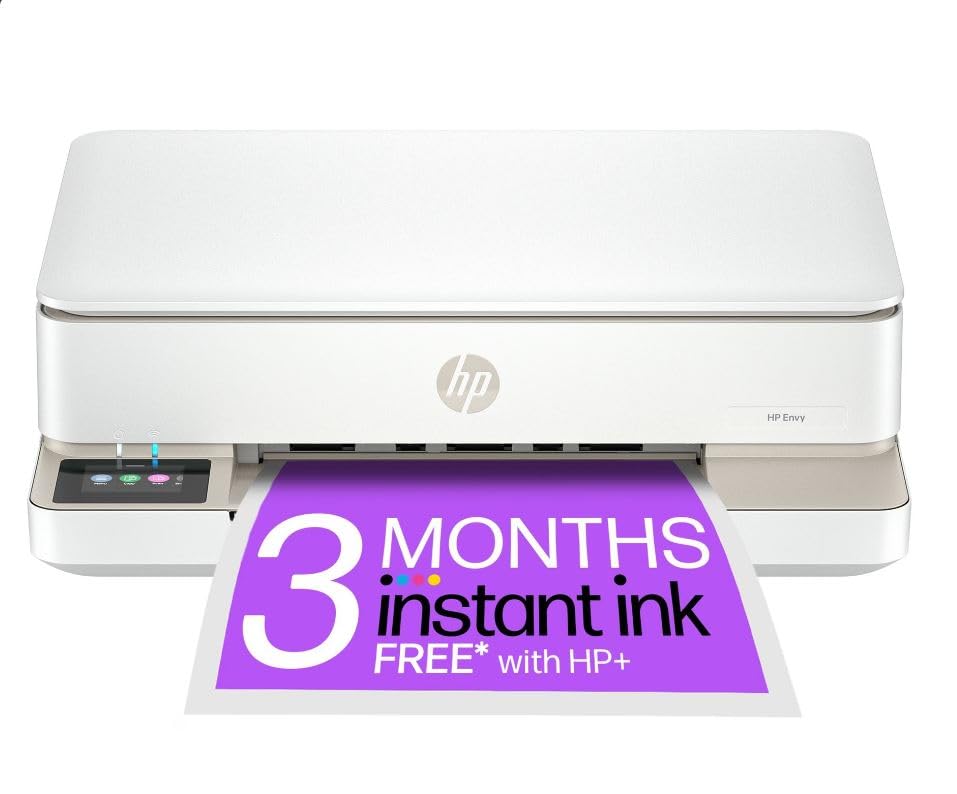
The HP Envy 6120e delivers solid photo printing and automatic duplex capability whilst keeping running costs manageable through HP’s Instant Ink subscription service.
Pros
- Dual-band Wi-Fi reconnects automatically and maintains a stable connection throughout daily use
- Automatic two-sided printing works smoothly for both documents and personalised photo cards
- Instant Ink subscription reduces cartridge costs significantly compared to buying replacements individually
Cons
- Print speeds of 10 pages per minute for black and 7 for colour feel sluggish when working through longer jobs.
- Initial setup requires creating an HP account and working through the Instant Ink activation steps, which takes a little longer than a standard printer setup.
We found the compact design fits comfortably on smaller desks without dominating the workspace. The paper tray slides underneath the unit, which saves considerable room compared to traditional front-loading models.
Print quality impressed us for both everyday documents and borderless photos. The colour touchscreen makes navigating settings straightforward, though we did need a few attempts to get comfortable with the menu layout.
The Instant Ink programme genuinely cuts costs if you print regularly. HP monitors your ink levels remotely and posts new cartridges before you run out. This convenience suits busy households, though some users may prefer buying cartridges as needed rather than committing to a monthly subscription.
Wireless connectivity proved reliable once we completed the initial setup. The self-healing Wi-Fi feature reconnected automatically after router restarts, which eliminated the frustrating troubleshooting we’ve experienced with other budget printers.
Scanner performance handles typical home tasks like copying documents and digitising old photos. The flatbed design accommodates thicker items such as pages from bound books without difficulty.
5. Epson Expression Home XP-2200

The XP-2200 works well for occasional home printing needs if you can tolerate a frustrating setup process and slow speeds.
Pros
- Individual ink cartridges available in standard and XL sizes keep running costs down
- Compact design saves desk space whilst offering print, scan and copy functions
- Wi-Fi Direct lets you print without needing a wireless network
Cons
- Initial setup requires downloading the Epson Smart Panel app and locating a password hidden inside the printer before you can even begin printing.
- Colour printing crawls along at just 4 pages per minute, making it impractical for anything beyond light occasional use.
- Cartridge recognition can be temperamental when installing new inks, which undermines the printer’s main selling point of affordable running costs.
We found the setup unnecessarily complicated for what should be a straightforward process. The machine demands you download the Epson Smart Panel app before you can even begin, then you need to locate a password tucked away inside the printer itself.
Once we got past the initial hurdles, the XP-2200 handled our light printing needs reasonably well. The Pineapple 604 ink system uses separate cartridges for each colour, which means you only replace what runs out. We appreciated this cost-saving feature during our testing period.
Print quality came out clear and vibrant for both documents and photos. However, patience is required as colour prints emerged quite slowly compared to monochrome ones. The scanner performed adequately for basic tasks like digitising receipts and documents.
The compact footprint suited our limited desk space nicely. We connected our phones and tablets through Wi-Fi without issues after the initial setup drama. The 150-sheet input tray holds enough paper for several weeks of light use.
Where this printer stumbles is reliability with third-party cartridges. We experienced recognition problems when trying to use compatible inks, which defeats the purpose of buying a printer specifically for affordable running costs.
What to Look for in a Printer with Cheap Cartridges
When we’re searching for a printer with affordable cartridges, the cost per page should be our first consideration. This metric tells us exactly how much we’ll spend on ink or toner for each printed sheet.
Ink vs Toner Cartridges
We need to decide between inkjet and laser printers. Inkjet models use liquid ink cartridges, whilst laser printers rely on toner powder. Laser toner typically offers better value for high-volume printing.
Cartridge Yield
The yield indicates how many pages a single cartridge can print. Higher-yield cartridges cost more upfront but reduce the cost per page significantly. We should always check the manufacturer’s stated page yield before purchasing.
Cartridge Availability
We must ensure replacement cartridges are readily available from multiple retailers. Printers with widely available cartridges give us more options for finding competitive prices.
Compatible and Remanufactured Options
Some printers work with third-party compatible or remanufactured cartridges. These alternatives can cost 50-70% less than original cartridges. We should verify whether using third-party cartridges will affect the warranty.
Key Features to Compare
| Feature | Why It Matters |
|---|---|
| Cost per page | Direct measure of ongoing expenses |
| Cartridge yield | Higher yield means fewer replacements |
| Separate colour cartridges | Replace only colours that run out |
| XL cartridge options | Larger cartridges reduce per-page costs |
Print Volume Needs
We need to assess our monthly printing requirements. Light users might save money with a basic inkjet, whilst heavy users benefit from laser printers with economical toner cartridges.
| Product | Rating | Price |
|---|---|---|
| HP DeskJet 2810e★ BEST BUY | ★★★★★ | Check Price |
| Epson Expression Home XP-4200 | ★★★★ | Check Price |
| Canon PIXMA TR4755i | ★★★★ | Check Price |
| HP Envy 6120e | ★★★ | Check Price |
| Epson Expression Home XP-2200 | ★★ | Check Price |
The HP DeskJet 2810e is our top pick for the best printer for cheap cartridges, thanks to its Instant Ink subscription that slashes ongoing costs by up to 70%, combined with effortless wireless setup and reliable everyday performance. It delivers the best balance of low running costs and ease of use for home printing.