

Creating custom stickers at home requires a printer that can handle specialised media and deliver vibrant, durable results. Whether you’re making labels for your small business, decorations for events, or personalised designs for gifts, the right equipment makes all the difference. A dedicated sticker printer produces sharp images with accurate colours that resist fading and moisture.
When choosing the best printer for stickers, you need to consider ink type, media compatibility, and print resolution.
Inkjet printers with dye or pigment-based inks work well for different sticker applications, while laser printers suit high-volume production. The printer must also accept thicker sticker paper and vinyl materials without jamming.
We tested multiple printers to identify the ones that produce professional-quality stickers reliably and efficiently.
1. Nelko PP01 Photo Printer
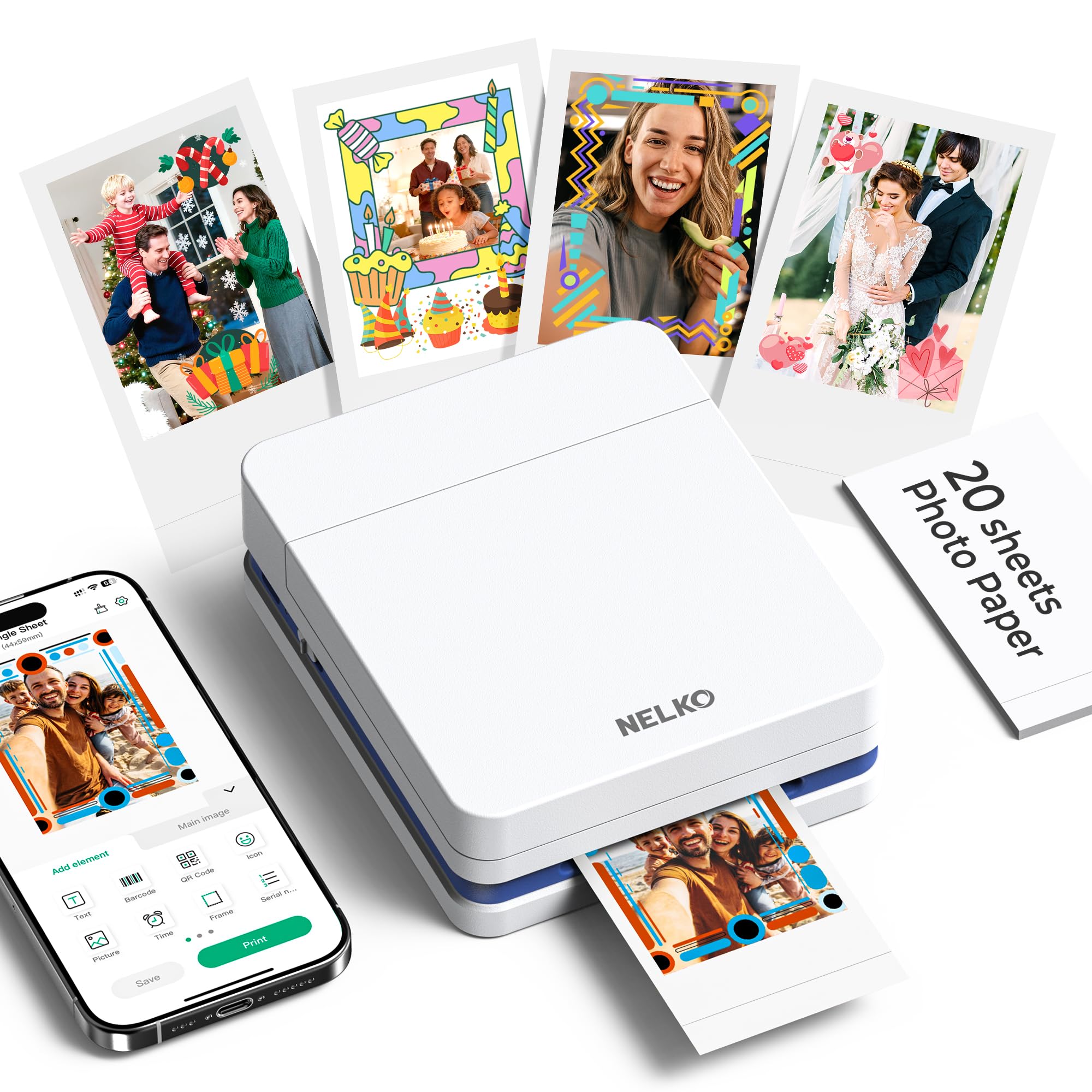
The Nelko PP01 delivers surprisingly good print quality for sticker making, though you’ll need to use it regularly to avoid ink clogging issues.
Pros
- Produces vibrant, adhesive-backed prints that resist water and smudging
- Incredibly lightweight at just 0.6 pounds, making it genuinely portable
- Prints arrive in under 60 seconds with decent colour accuracy
Cons
- Ink cartridges can clog after several days without use, so running a quick cleaning cycle before each session keeps it in top condition.
We found the setup process straightforward when we first unboxed this printer. The Bluetooth connection to our phone worked immediately, and the Nelko app downloaded without hassle. Loading the sticky-backed paper took a moment to figure out, but the smooth side down rule became second nature after the first attempt.
The print quality genuinely impressed us for such a compact device. Colours came out rich and realistic, capturing details we didn’t expect from a portable printer. The adhesive backing stuck firmly to our scrapbook pages and phone cases without peeling off.
However, we discovered a frustrating flaw during our second week of testing. After leaving the printer unused for five days, the ink jets had clogged completely. Our prints came out streaky and faded until we ran several cleaning cycles. This became a recurring problem whenever we took breaks between printing sessions.
The 4×6 inch print size works perfectly for sticker projects and journal decoration. We appreciated how quickly each photo printed, usually finishing within 45 seconds. The prints felt durable and didn’t smudge when we handled them immediately after printing.
For regular use, this printer performs admirably. We just wish the ink cartridge system was more forgiving of occasional users who don’t print daily.
★ BEST BUY
2. Memoking T02 Mini Printer

This pocket-sized thermal printer delivers solid performance for students and small businesses without the hassle of ink cartridges.
Pros
- Connects to phones via Bluetooth in seconds and prints immediately
- Works with various paper types including clear and coloured thermal sticker sheets
- Compact enough to slip into a bag or desk drawer without taking up space
Cons
- The app age restriction of 17 and over limits its use for younger students, though a parent or teacher can easily manage printing on their behalf.
We’ve been using the Memoking T02 for everything from anatomy flashcards to address labels. The setup process took less than two minutes once we downloaded the Phomemo app.
The thermal printing technology means we never worry about running out of ink or dealing with messy cartridges. We simply load the thermal paper roll and start printing. The 203 dpi resolution produces crisp text that’s perfectly readable for study notes and small labels.
What impressed us most was how lightweight this printer feels at just under 100 grams. We carry it between home and the office without even noticing the extra weight. The built-in battery lasts through several printing sessions before needing a charge via the included USB-C cable.
The scan function turned out to be surprisingly useful. We point our phone camera at a diagram or text, and the app captures it for immediate printing. This feature saves loads of time when creating revision materials.
The printer handles 53mm wide paper, which suits most sticker and label projects. We’ve printed shopping lists, bookmarks, and organisational labels without any feeding issues. The paper holder keeps rolls secure during transport.
Customer support responded quickly when we had questions about paper compatibility. The company stands behind their product, which matters when investing in any printing device.
3. Nelko PM230 Sticker Printer

The Nelko PM230 is a solid choice for casual sticker printing if you prioritise portability and ease of use over professional-grade print quality.
Pros
- Compact design makes it incredibly easy to carry around and store in small spaces
- Connects to our phones quickly via Bluetooth without any frustrating setup issues
- Comes with three rolls of thermal paper so we can start printing straight away
Cons
- Print quality shows visible dots and lacks the sharpness we’d expect at this price point, particularly noticeable when printing detailed photographic images.
- Only prints in black and white, which limits creative possibilities for those wanting colourful sticker designs.
We found the PM230 refreshingly simple to set up. The Nelko app downloaded quickly, and pairing our phone took less than a minute once we held down the power button. The white indicator light flashed, and we were ready to print our first sticker.
The app surprised us with its range of features. We used the AI text-to-image function to create custom designs without any drawing skills. The OCR scanner worked well for converting handwritten notes into printable text. Templates covered everything from study notes to greeting cards.
Print quality sits somewhere between acceptable and disappointing. The 300 dpi resolution produces legible text and recognisable images, but we spotted individual dots in our printouts. Photos came out darker than expected, though adjusting the contrast in the app helped somewhat.
The thermal printing technology means no ink cartridges to replace, which keeps running costs down. We appreciated that the included paper rolls lasted quite a while for everyday use. The printer fits comfortably in our bag for on-the-go printing.
Our main frustration was cutting stickers manually. Every print required scissors, which slowed down our workflow considerably. A serrated edge or built-in cutter would transform the user experience. The 48mm paper width works fine for small labels but feels limiting for larger projects.
Battery life held up well during our testing. We printed dozens of stickers on a single charge without issues. The compact size makes it perfect for students or hobbyists who want something portable, though professionals might find it too basic for serious work.
4. JADENS Bluetooth Thermal Label Printer

This wireless thermal printer offers excellent value for small business owners who need reliable sticker and label printing without the ongoing cost of ink.
Pros
- Connects wirelessly via Bluetooth to phones and tablets, making it incredibly convenient for printing on the go
- Setup takes under five minutes with straightforward pairing and intuitive mobile app
- Crisp 203 DPI print quality produces sharp barcodes and text that scan perfectly every time
Cons
- Mac users are limited to USB connection as Bluetooth is not supported on macOS, so keep the cable handy if you work primarily on Apple computers.
- Occasional Bluetooth connectivity hiccups require re-pairing, though this happens infrequently enough that it rarely disrupts a normal workflow.
We found the JADENS printer refreshingly easy to use straight out of the box. After plugging it in and downloading the companion app, we were printing our first shipping label within minutes. The Bluetooth pairing worked smoothly with our iPhone, and we appreciated not having to mess about with complicated driver installations.
Print quality impressed us more than we expected for a thermal printer in this price range. The labels come out clean with sharp edges, and barcodes scan without any issues at the post office. We’ve printed hundreds of labels for Royal Mail and Hermes parcels, and the consistency has been spot on throughout.
The thermal printing technology means there’s no ink to replace, which keeps running costs remarkably low. We simply load the label rolls, and the printer handles both fanfold and roll labels up to 4.1 inches wide. This flexibility works brilliantly whether we’re printing standard address labels or custom sticker designs.
One thing that caught us off guard was discovering the Mac Bluetooth limitation after purchase. If you’re primarily a Mac user, you’ll need to keep the USB cable handy since wireless printing only works with Windows, Android, and iOS devices. This feels like an odd restriction for an otherwise well-designed product.
The build quality feels solid for daily use. At 1.74 kg, it sits firmly on our desk without sliding around during printing. We’ve been using it regularly for months now, and it handles our shipping workflow much faster than our previous method of using a standard printer and cutting out labels with scissors.
5. MUNBYN RealWriter 130 Bluetooth Label Printer

This printer offers excellent wireless connectivity and fast printing speeds that make creating sticker labels remarkably convenient for small businesses and crafters.
Pros
- Connects wirelessly to virtually any device through Bluetooth without needing drivers on most systems
- Prints at impressive speeds of up to 60 labels per minute with sharp, clear output
- Lightweight and portable design makes it easy to move around your workspace
Cons
- Occasional label feeding stutters can cause the print to start slightly too high on the sheet, which requires a reprint and recalibration through the app.
- The mobile app occasionally glitches, so saving your label designs frequently is a good habit to get into before longer print runs.
- Not compatible with Windows systems running ARM processors, which is worth confirming before purchasing if you’re unsure about your machine’s architecture.
We’ve been using this printer for sticker production and the setup process was genuinely straightforward. The Bluetooth connection worked immediately with our phone and laptop, which saved us from dealing with complicated driver installations.
The print quality impressed us right away. Labels come out crisp with well-defined text and graphics that look professional on our sticker designs. We tested it with various label sizes and the automatic calibration feature handled different widths without requiring manual adjustments.
Speed is where this printer really shines. Churning through batches of stickers happens quickly, and we appreciate how the direct thermal technology eliminates the need for ink cartridges. The Japanese ROHM print head delivers consistent results batch after batch.
We did notice the label feeding can be inconsistent. Every so often, the printer hesitates mid-pull, and we’ve had to reprint labels when they started printing too high on the sheet. These hiccups happen infrequently enough that they haven’t been dealbreakers for us.
The compact size fits comfortably on our workspace without dominating the desk. At just 720 grams, we can easily pick it up with one hand and tuck it away when not in use. The eco-friendly construction using recycled materials is a thoughtful touch that aligns with sustainable business practices.
What to Look for in the Best Printer for Stickers
When we’re shopping for a sticker printer, we need to consider several key factors to find the right match for our needs.
Print Technology
Inkjet printers offer vibrant colours and work well with various sticker materials. They’re typically more affordable upfront and handle photo-quality designs beautifully. Laser printers provide faster output and better water resistance, though they cost more initially.
Media Compatibility
We should check which materials the printer supports. Look for models that handle different thicknesses and finishes, including glossy, matte, and vinyl stickers. Some printers struggle with heavier media, so verifying specifications is essential.
Print Size and Volume
Consider the maximum print dimensions we’ll need. A4 is standard, but larger formats give us more flexibility. We also need to think about monthly volume. Higher-capacity models suit business use, whilst smaller printers work fine for occasional projects.
Running Costs
| Cost Factor | What to Check |
|---|---|
| Ink/Toner | Price per cartridge and page yield |
| Replacement Parts | Drum units and maintenance kits |
| Energy Use | Power consumption ratings |
Connectivity Options
Modern printers should offer USB connectivity at minimum. Wi-Fi and mobile printing add convenience for multiple users. Ethernet connections benefit office environments.
Software and Colour Accuracy
We want printers with reliable drivers and good colour management tools. This ensures our stickers match what we see on screen. Check for compatibility with our operating system and design software.
| Product | Rating | Price |
|---|---|---|
| Nelko PP01 Photo Printer★ BEST BUY | ★★★★★ | Check Price |
| Memoking T02 Mini Printer | ★★★★ | Check Price |
| Nelko PM230 Sticker Printer | ★★★★ | Check Price |
| JADENS Bluetooth Thermal Label Printer | ★★★ | Check Price |
| MUNBYN RealWriter 130 Bluetooth Label Printer | ★★ | Check Price |
The Nelko PP01 Photo Printer is our top pick for the best printer for stickers, combining vibrant full-colour inkjet output, adhesive-backed prints, and genuine portability that suits everything from journal decoration to small business label making.